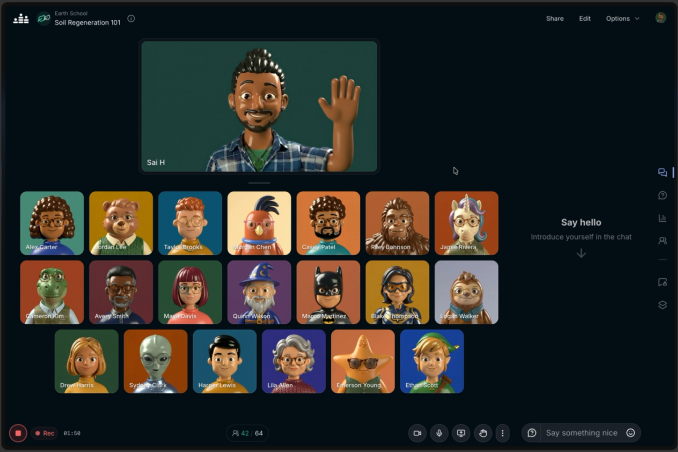
How to Run a Customer Education Webinar Series
Customer webinars can answer questions, build confidence and bring people together. Here’s how to turn occasional training sessions into a series customers want to use.
Most customer education starts with a familiar problem: you explain the same thing over and over again, often one customer at a time.
A live webinar won’t replace personal support, and it shouldn’t try to. But it can give people a chance to see a task done properly, ask about their own situation and learn from questions they might not have thought to ask.
The challenge is making the series useful to customers at different stages, without creating more work for your team than it saves.
Also check out our blog on How to Build a Monthly Webinar Programme People Actually Return To.
Give new and experienced customers different places to start
A new customer trying to set up their first project probably doesn’t need a session on advanced reporting. Equally, an experienced customer may not want to sit through the basics every month.
One simple structure is to rotate between three types of event:
Getting started: A clear walkthrough of the first task customers need to complete.
Going further: A practical session on a particular feature or workflow.
Office hours: An open session for questions, troubleshooting and ideas.
You could run one of each every quarter or make one format a regular monthly fixture. The right frequency is the one your team can maintain and your customers genuinely need.
Teach a task, not a menu of features
“An introduction to our reporting dashboard” tells a customer what you’re going to show them. “How to work out which campaigns brought in your best leads” tells them what they’ll be able to do.
Build the session around that outcome. Show the steps in context, include a common mistake or two, and pause for questions. If several customers are likely to have different starting points, a poll at the beginning can help you decide where to spend more time.
You can also ask a useful question at registration, such as “What would you most like us to cover?” Custom registration fields are available on Pro and Business plans. Keep it short. A long form can put people off signing up, and you can always learn more during the event.
Make questions part of the content
Some of the best customer education happens when someone asks, “But what if my situation is slightly different?”
Invite questions before and during the session. A dedicated Q&A area keeps them from disappearing in a busy chat, and attendees can signal which questions they would most like answered. On Crowdcast, answers can also be timestamped so someone watching the replay can find the relevant part later.
You don’t need to answer every individual account question in front of the group. If an issue involves private details, offer to follow it up separately. But the questions that come up repeatedly can help you improve your help docs, onboarding and future events.
Give the replay a purpose
The live session is valuable because people can take part. The replay helps customers who couldn’t make that time, or who need to repeat a task a month later.
Include a clear description of what the session covers and email attendees the most useful supporting links afterwards. If you run a connected course or onboarding programme, a multi-session event can put the sessions together under one registration while keeping separate replays for each topic.
Don’t assume that sending a reminder to watch the recording is the whole follow-up. Someone who asked a detailed question may need a personal reply; someone who missed the event may need a short note pointing them to the right section.
Let the series improve your customer experience
Look beyond the number of registrations. Are new customers attending the introductory session? What do they ask next? Do experienced customers come back for the more advanced topics? Are the same questions reaching support afterwards?
Use your event analytics to review attendance, engagement and replay views alongside the feedback your customer success and support teams receive.
You don’t need to prove that one webinar caused a customer to stay or upgrade. You do want to know whether the series is helping people make progress.
A good customer education programme feels less like a broadcast and more like an ongoing conversation. Each session answers a question, and the next one is shaped by what customers tell you they need.
See how Crowdcast can help your team run live customer training, office hours and replayable webinar series.
Louise
Head of Customer Success. Helping customers grow their audience with live events using Crowdcast's simple live video software to help them reach, engage, and grow their audience.